How to Make the Bulin 47 AI Video From One Photo
 Bulin 47 AI Team
A step-by-step guide to putting yourself in the Bulin 47 street freestyle: upload a photo, pick 480p or 720p HD and download the vertical MP4.
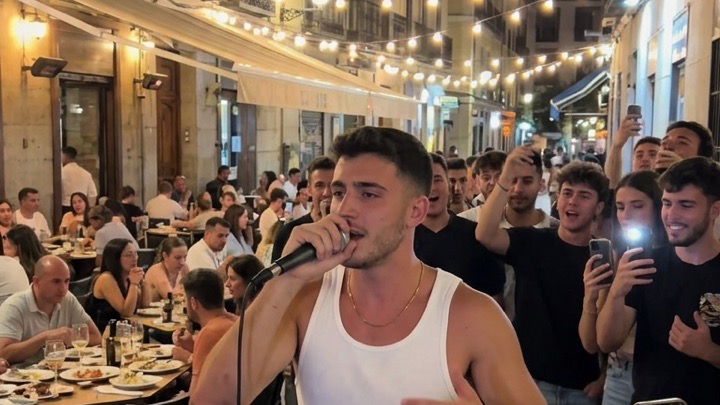
The Bulin 47 trend started with one clip: Bulin 47 freestyling on a street in Spain over the beat Kevin Wai is playing, while a crowd films on their phones. Lots of people want their own version. With Bulin 47 AI you don't need a crowd or editing skills, just one photo.
This guide walks through the whole process, from picking a photo to posting the video.
What you need
- One clear photo of yourself, or of someone who has given you permission. Front-facing with your upper body visible works best.
- A free account, so your videos are saved.
- Credits: a 19-second video is 10 credits at 480p or 25 credits in 720p HD.
Step 1: Upload your photo
On the homepage, tap Upload a photo or drag one into the box. JPG, PNG and WebP up to 10 MB are accepted.
Once the photo is in, the feed switches to Starring you, so you can browse the scenes with your photo.
Step 2: Pick 480p or 720p HD
Tick the permission box to confirm that the photo is you, or that you have the person's permission. Then press 720p HD (25 credits) or 480p (10 credits). Both are the same 19-second video; 480p is the cheaper way to try a new photo.
If the render fails or gets blocked, the credits come back automatically.
Step 3: Download
Rendering takes a few minutes. When it's ready, download the MP4. It has the original sound lined up with your moves, and it's vertical (9:16), so it fits TikTok, Instagram Reels and YouTube Shorts without cropping.
Step 4: Post it
- Your video already has the original sound, so there's no need to add music in the app.
- Mention that the video is AI-generated where the platform asks you to.
- Tag your friends and challenge them to make their own.
Is it a face swap?
Yes, it's an AI performer swap. An AI video-editing model replaces the performer in the original clip with the person in your photo, and replaces the people around them with new AI-generated people, so the crowd is different every time. Only use a photo of yourself or of an adult who agreed, and don't present the result as real footage.
Common questions
Can I use a friend's photo? Only with their permission. Photos of celebrities, public figures and minors aren't allowed.
Why doesn't it look exactly like me? AI isn't perfect. A sharper, front-facing photo with good light usually fixes it. See our photo tips.
Do credits expire? No. Credit packs never expire. See pricing.
Ready? Make your freestyle.